Search for last-minute train slots (STDCM)
OSRD can be used to find a slot for a train in an already established
timetable, without causing conflicts with other trains.
The acronym STDCM (Short Term Digital Capacity Management) is used
to describe this concept in general. It’s sometimes called LMR
(“last minute request”) when talking about the actual product in SNCF.
For video explanations, the subject has been explained twice at FOSDEM
with replays available:
in 2023 and
in 2026.
The first video focuses on the technical details, it’s quite old and
thus incomplete, but only a few details are actually wrong.
The second video does a quick explanation of the implementation,
but focuses more on how it’s integrated in SNCF processes.
Note: some of the visuals here use the old OSRD interface, but they’re still relevant.
This website section is generally not updated very often, but the concepts
described here are general enough not to require frequent updates.
For a more accurate and in-depth explanation, check out the source code itself.
Or reach out to us on matrix.
1 - Business context
Some definitions:
Capacity
Capacity, in this context, is the ability to
reserve infrastructure elements to allow the passage of a train.
Capacity is expressed in both space and time:
the reservation of an element can block a specific zone
that becomes inaccessible to other trains, and this reservation
lasts for a given time interval.
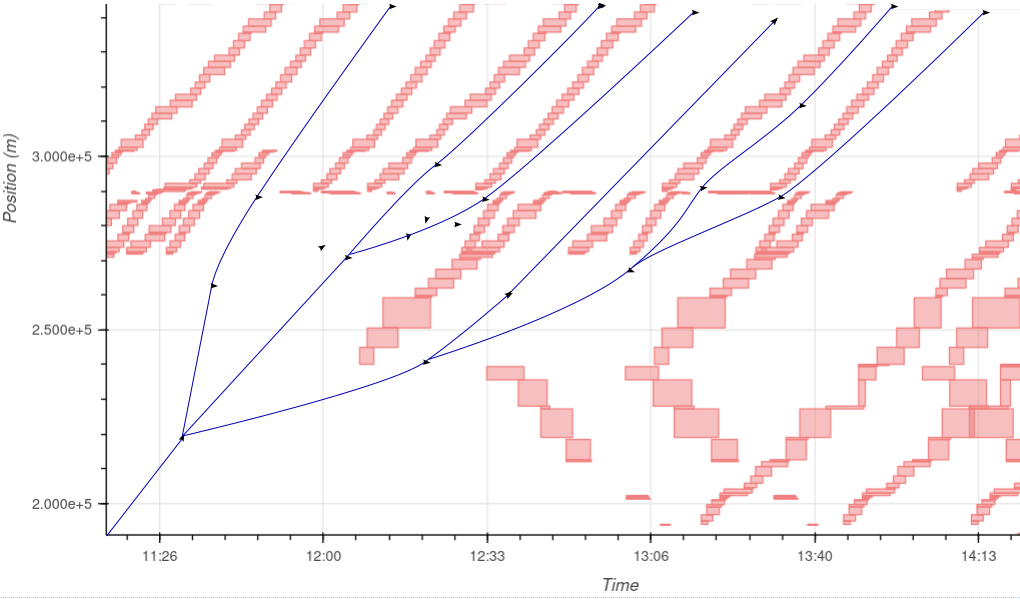
It can be displayed
on a chart, with the time on the horizontal axis
and the distance traveled on the vertical axis.
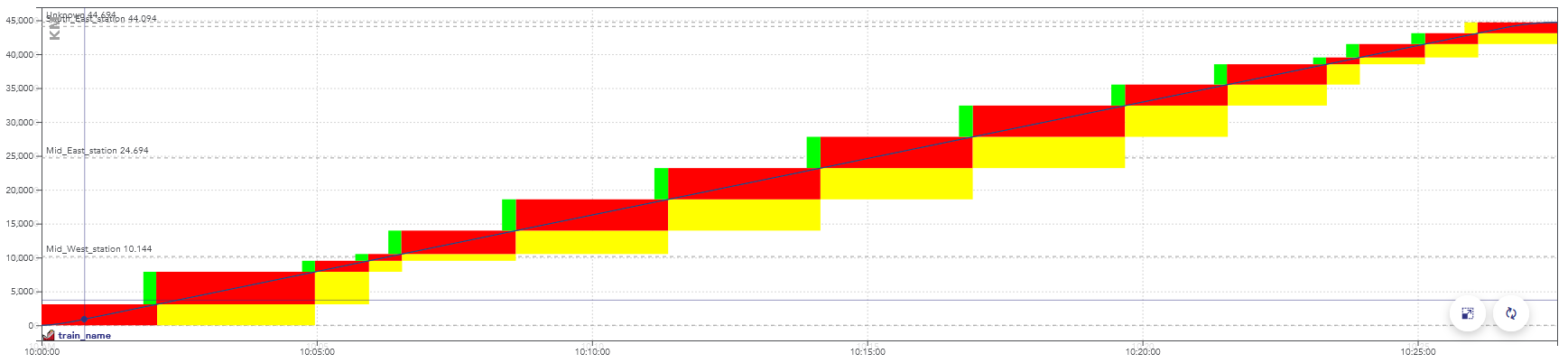
Example of a space-time chart displaying the passage of a train.
The colors here represent aspects of the signals, but
display a consumption of the capacity as well:
when these blocks overlap for two trains, they conflict.
There is a conflict between two trains when they reserve
the same object at the same time, in incompatible configurations.
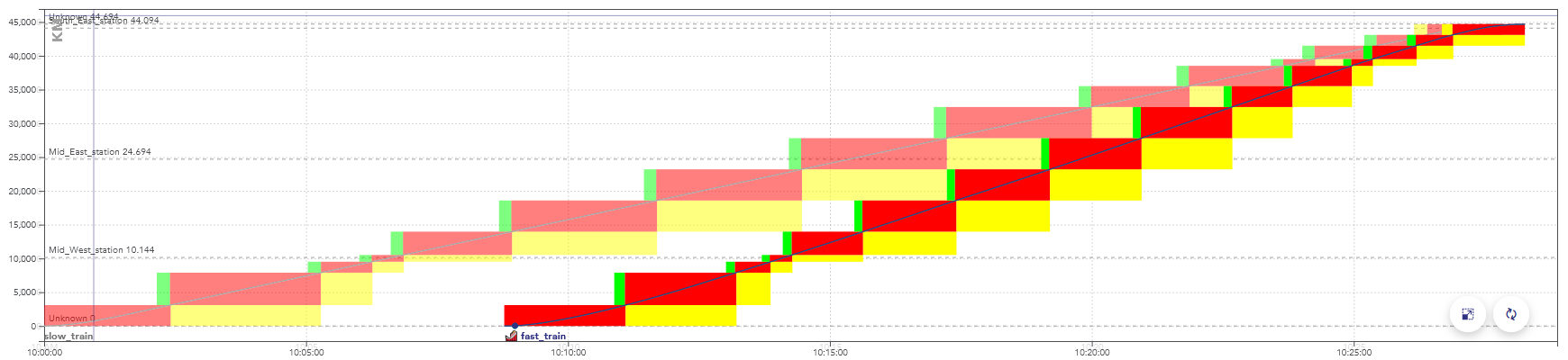
Example of a space-time graph with a conflict: the second train
is faster than the first one, they are in conflict at the end
of the path, when the rectangles overlap.
When simulating this timetable, the second train would be
slowed down by the yellow signals, caused by the
presence of the first train.
Train slots
A train slot corresponds to a capacity reservation
for the passage of a train. It is fixed in space and time:
the departure time and the path taken are known.
On the space-time charts in this page, a train slot corresponds
to the set of blocks displayed for a train.
Note: in English-speaking countries, these are often simply called “train paths”.
But in this context, this name would be ambiguous with the
physical path taken by the train.
The usual procedure is for the infrastructure manager
(e.g. SNCF Réseau) to offers train slots for sale to
railway companies (e.g. SNCF Voyageurs).
At a given date before the scheduled day of operation,
all the train paths are allocated. But there may be
enough capacity to fit more trains. Trains can fit between
scheduled slots,
when they are sufficiently far apart or have not found a buyer.
The remaining capacity after the allocation of train paths is called
residual capacity. This section explains how OSRD looks
for train slots in this residual capacity.
2 - Train slot search module
This module handles the search for solutions.
To summarize how it works: the search space is defined as one large decision tree.
We first build one decision tree that lists all possible paths, where
each “decision” is the direction taken. We then build another tree on top
of it that handles simulations and conflicts, branching is done when the new
train gets to choose if it goes before or after a different train.
We then run an A* on the resulting graph.
2.1 - Infrastructure exploration
The first thing we need to define is how we move through the infrastructure,
without dealing with conflicts yet.
We need a way to define and enumerate the different possible paths and
explore the infrastructure graph, with several constraints:
- The path must be compatible with the given rolling stock
(loading gauge / electrification / signaling system)
- At any point, we need to access path properties from its start up to the
considered point. This includes block and route lists.
- We sometimes need to know where the train will go after the
point currently being evaluated, for proper conflict detection
To do this, we have defined the class InfraExplorer.
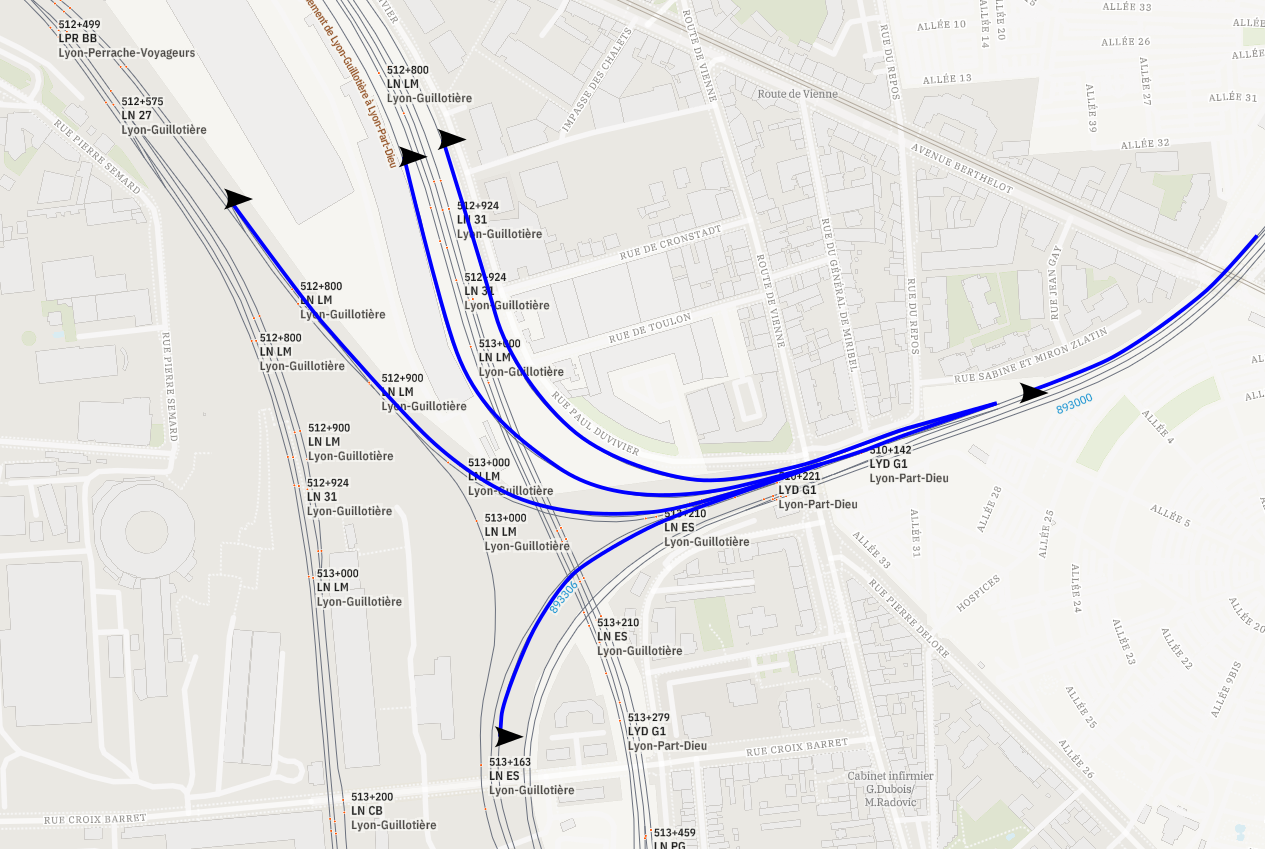
It has one purpose: enumerating all possible paths.
This is the class that handles the “path” aspect of the decision tree.
It uses blocks (sections from signal to signal) as a main subdivision.
It has 3 sections: the current block, predecessors, and a “lookahead”.

In this example, the green arrows are the predecessor blocks.
What happens there is considered to be immutable.
The red arrow is the current block. This is where we run
train and signaling simulations, and where we deal with conflicts.
The blue arrows are part of the lookahead. This section hasn’t
been simulated yet, its only purpose is to know in advance
where the train will go next. In this example, it would tell us
that the bottom right signal can be ignored entirely.
The top path is the path being currently evaluated.
The path that goes toward the bottom right track, if valid,
will be evaluated in a different InfraExplorer that would have
been generated alongside this instance.
The InfraExplorer is manipulated with two main functions
(the accessors have been removed here for clarity):
interface InfraExplorer {
    /**
     * Clone the current object and extend the lookahead by one route, for each route starting at
     * the current end of the lookahead section. The current instance is not modified.
     */
    fun cloneAndExtendLookahead(): Collection<InfraExplorer>

    /**
     * Move the current block by one, following the lookahead section. Can only be called when the
     * lookahead isn't empty.
     */
    fun moveForward(): InfraExplorer
}
cloneAndExtendLookahead() is the method that actually enumerates the
different paths, returning clones for each possibility.
It’s called when we need a more precise lookahead to properly identify
conflicts, or when it’s empty and we need to move forward.
A variation of this class can also keep track of the train simulation
and time information (called InfraExplorerWithEnvelope).
This is the version that is actually used to explore the infrastructure.
We now have a way to enumerate all possible paths:
2.2 - Conflict detection
Once we know what paths we can use, we need to know when they
can actually be used.
The documentation
of the conflict detection module explains how it’s done internally.
Generally speaking, a train is in conflict when it has to slow down
because of a signal. In our case, that means the solution would not
be valid, we need to arrive later (or earlier) to see the signal
when it’s not restrictive anymore.
In STDCM, conflicts can also be caused by work schedules.
The complex part is that we need to do the conflict detection incrementally
Which means that:
- When running simulations up to t=x, we need to know all of the conflicts
that happen before x, even if they’re indirectly caused by a
signal seen at t > x down the path.
- We need to know the conflicts and resource uses right as they start
even if their end time can’t be defined yet.
For that to be possible, we need to know where the train will go
after the section that is being simulated (see
infra exploration:
we need some elements in the lookahead section).
To handle it, the conflict detection module
returns an error when more lookahead is required. When it happens
we extend it by cloning the infra explorer objects.
Note to maintainers: the actual incremental conflict detection is handled
by the class IncrementalConflictDetector. When debugging in local,
it can be inspected and patched to identify exactly where requirements come from.
2.3 - Conflict avoidance
While exploring the graph, it is possible to end up in locations that would
generate conflicts. They can be avoided by adding delay.
Shifting the departure time
The departure time is defined as an interval in the module parameters:
the train can leave at a given time, or up to x seconds later.
Whenever possible, delay should be added by shifting the departure time.
for example : a train can leave between 10:00 and 11:00. Leaving
at 10:00 would cause a conflict, the train actually needs to enter the
destination station 15 minutes later. Making the train leave at
10:15 solves the problem.
In OSRD, this feature is handled by keeping track, for every edge,
of the maximum duration by which we can delay the departure time.
As long as this value is enough, conflicts are avoided this way.
This time shift is a value stored in every edge of the path.
Once a path is found, the value is summed over the whole path.
This is added to the departure time.
For example :
- a train leaves between 10:00 and 11:00. The initial maximum
time shift is 1:00.
- At some point, an edge becomes unavailable 20 minutes after the
train passage. The value is now at 20 for any edge accessed from here.
- The departure time is then delayed by 5 minutes to avoid a conflict.
The maximum time shift value is now at 15 minutes.
- This process is applied until the destination is found,
or until no more delay can be added this way.
Engineering allowances
Once the maximum delay is at 0, the delay needs to be added
between two points of the path.
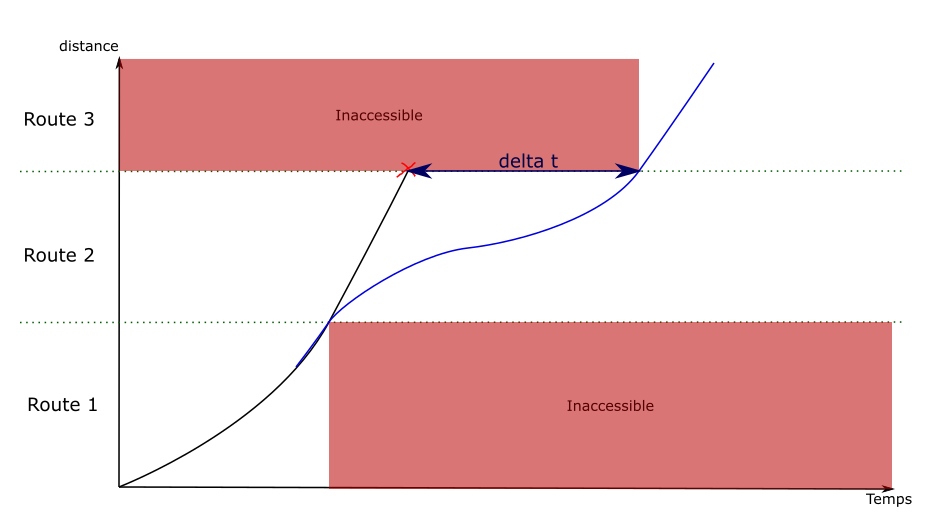
The idea is the same as the one used to fix speed discontinuities:
new edges are created, replacing the previous ones.
The new edges have an engineering allowance, to add the delay where
it is possible.
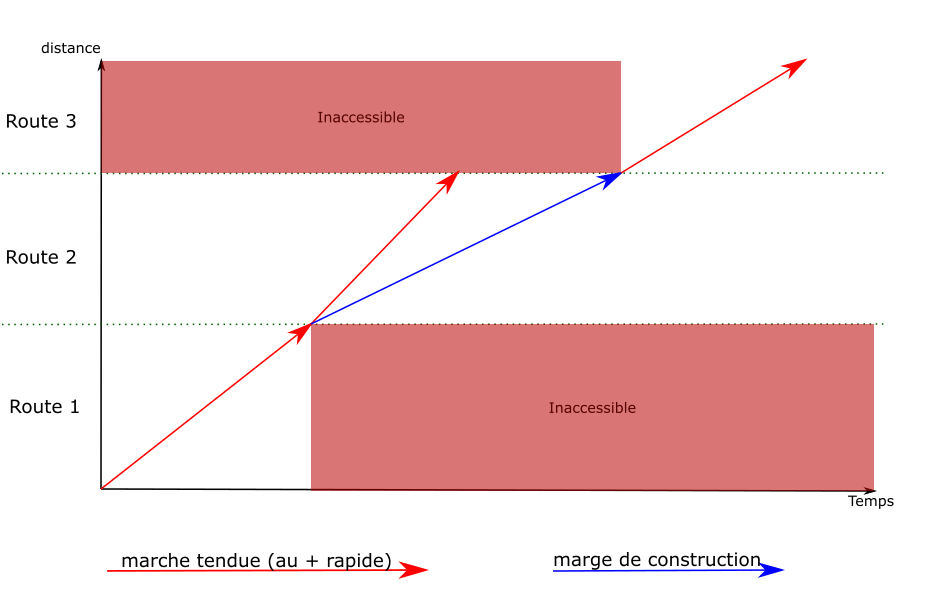
computing an
engineering allowance
is a feature of the running-time
calculation module. It adds a given delay between two points of
a path, without affecting the speeds on the rest of the path.
Post-processing
We used to compute the engineering allowances during the graph
exploration, but that process was far too expensive. We used to
run binary searches on full simulations, which would sometimes
go back for a long distance in the path.
What we actually need is to know whether an engineering allowance
is possible without causing any conflict. We can use heuristics
here, as long as we’re on the conservative side: we can’t
say that it’s possible if it isn’t, but missing solutions with
extremely tight allowances isn’t a bad thing in our use cases.
But this change means that, once the solution is found, we can’t
simply concatenate the simulation results. We need to run
a full simulation, with actual engineering allowances,
that avoid any conflict. This step has been merged
with the one described on the
standard allowance
page, which is now run even when no standard allowance
have been set.
2.4 - Discontinuities and backtracking
The discontinuity problem
When a new graph edge is visited, a simulation is run to evaluate
its speed. But it is not possible to see beyond the current edge.
This makes it difficult to compute braking curves, because
they can span over several edges.
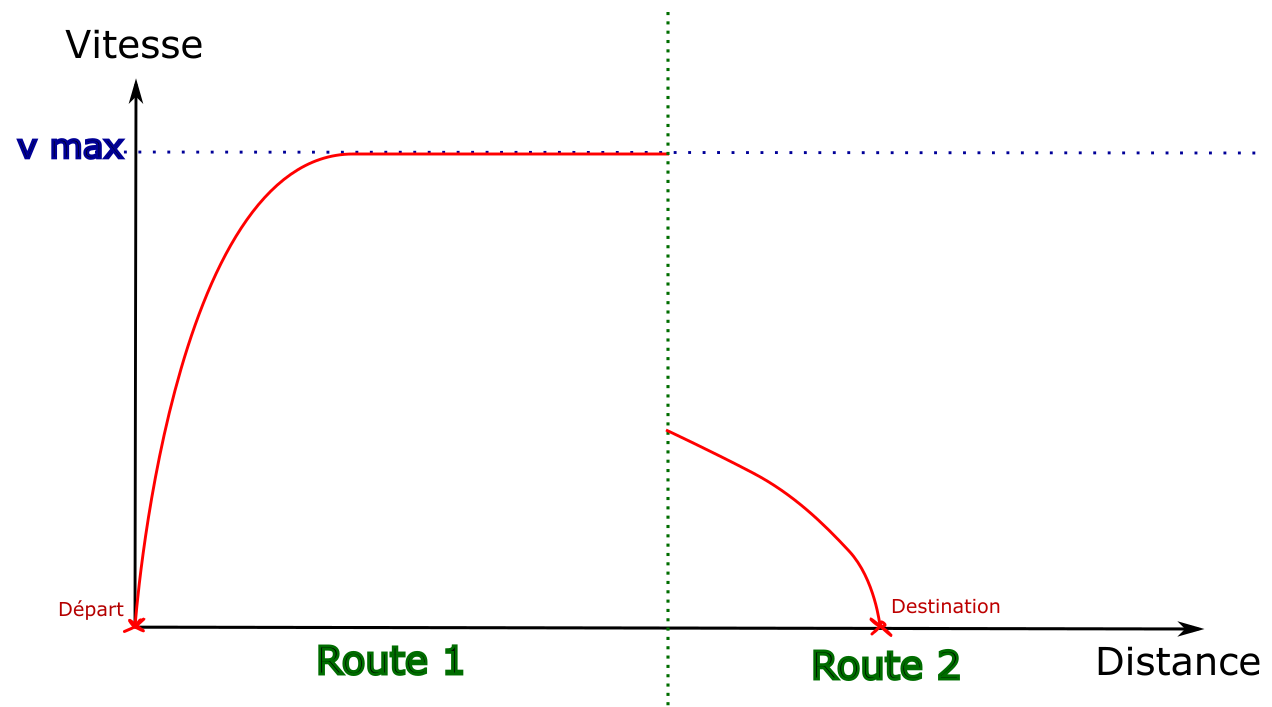
This example illustrates the problem: by default
the first edge is explored by going at maximum speed.
The destination is only visible once the second edge is visited,
which doesn’t leave enough distance to stop.
Solution : backtracking
To solve this problem, when an edge is generated with a
discontinuity in the speed envelopes, the algorithm goes back
over the previous edges to create new ones that include the
decelerations.
To give a simplified example, on a path of 4 edges
where the train can accelerate or decelerate by 10km/h per edge:
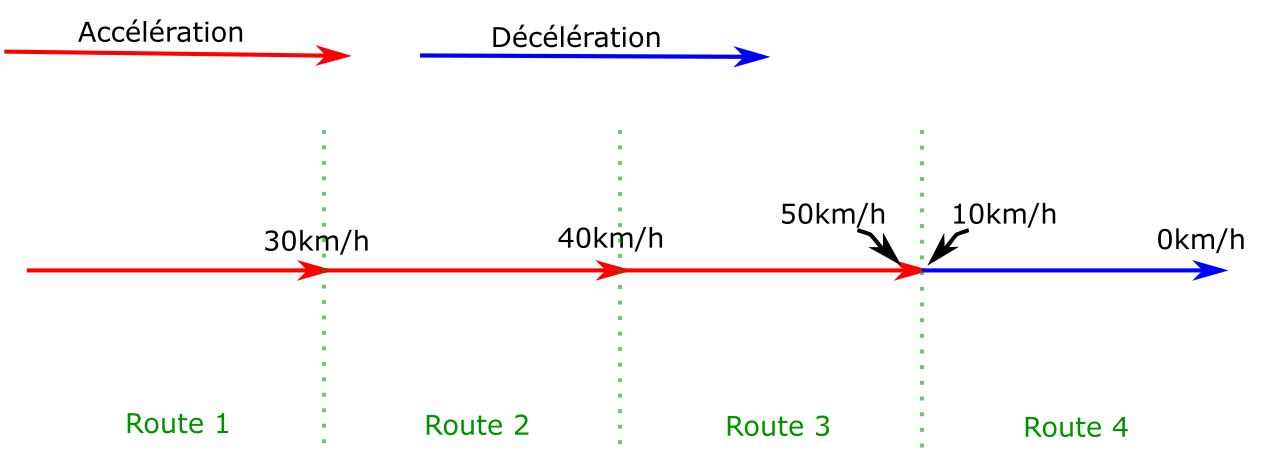
For the train to stop at the end of route 4, it must be at most
at 10km/h at the end of edge 3. A new edge is then created on
edge 3, which ends at 10km/h. A deceleration is computed
backwards from the end of the edge back to the start,
until the original curve is met (or the start of the edge).
In this example, the discontinuity has only been moved to the
transition between edges 2 and 3. The process is then repeated
on edge 2, which gives the following result:
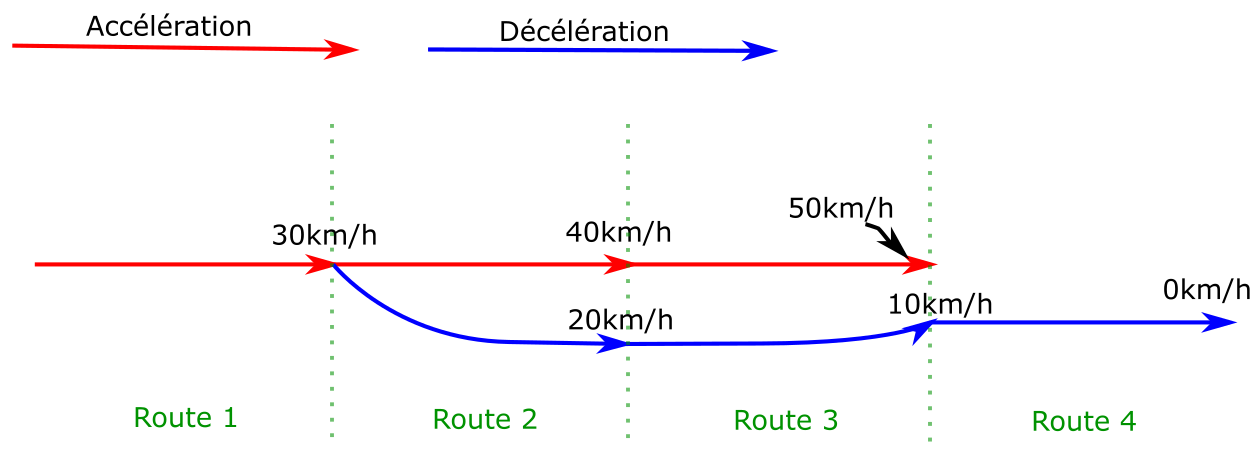
Old edges are still present in the graph as they can lead to other solutions.
2.5 - Search space and decision tree
Now that we can enumerate the paths and identify conflicts, we need
to build the final decision tree that avoids all conflicts.
In terms of implementation, we would like to have a class with a similar
purpose as
InfraExplorer, but currently it’s all over the place.
There’s
a refactoring issue,
but we may not have the time to do it.
The search space is described as a graph with nodes and edges.
Edges are generally one signaling block long, but may be shorter
in case of stops.
Generating new edges on a given path follow this sequence:
- The train movement is generated on the new segment (time and speed at each point)
- Conflicts are identified during this time segment
- Openings are identified
- One edge is generated per opening
An “opening” is an available time window between two occupied blocks.
When there are several different openings, we get to choose if the
new train goes before or after another train or work schedule.
On one given path, we now have a decision tree that looks like this:
Delays
We often need to add delay to the current simulation to actually go
through an opening, when the train needs to reach a point later than it could have.
This can be done in several different ways:
- Delaying the train departure
- Lengthening a stop
- Forcing the train to go slower for a while (with something called “engineering allowances”)
We keep track of how much delay we can add at any given point to handle
departure and stop changes. For engineering allowances, we’re identifying
how much delay we can add if the train slows down then immediately speeds up.
2.6 - The actual pathfinding
Once we have a graph that describes the entire search space,
we can run a pathfinding algorithm. In this case, we use an
A*.
We need to define a few things first:
- How to sort the nodes, which defines which solution is considered better than the other
- How to identify redundant nodes
- How to estimate the remaining “cost” at any given point
(the heuristic)
Node ordering
We currently define a hierarchy across different criteria:
we first compare the most important one, and move on
to the next if equal, until we reach the end of the list.
That order is defined in STDCMNode,
in compareTo. It tends to change more often than this website
is updated, so it’s best to check the code itself.
The main criteria is the best possible total travel time:
the sum of the current travel time to reach this node and the
minimum remaining travel time from this node to the destination
(as defined/computed by the heuristic).
Stop duration isn’t included here.
Defining redundant (visited) nodes
This is handled by VisitedNodes.
The idea is that, at any given physical location, we mark
time ranges as “visited”.
For example: consider a node reached at earliest t=10:00,
where we can delay the departure by 30 minutes, and we
can’t add any engineering allowance (added time by slowing down).
Then the location will be flagged as “visited” from t=10:00 to t=10:30.
Engineering allowance means we can also reach some other time range
by lengthening the travel time. But it may not be the optimal
way to reach a given time. So we can mark a range as “conditionally visited”,
where it’s visited at a given cost value. These ranges are
compared to the new range and cost to identify if the new node is redundant.
Heuristic
Most of the algorithmic complexity here comes from the high
number of nodes for any given location. Going through the
entire block graph once is comparatively quite fast.
So we go through the entire block graph, starting at the
destination, and we keep track of the fastest time it takes
to reach the destination from any given point.
We keep track of intermediate path steps, max speed, and
decelerations (including decelerations caused by requested stops).
But we can’t consider accelerations at this stage.
It may sound slow and expensive (and it can be), but it drastically
lowers the standard deviation and upper bound in search time.
2.7 - Standard allowance
The STDCM module must be usable with
standard allowances.
The user can set an allowance value, expressed either as a function of
the running time or the travelled distance. This time must be added to the
running time, so that it arrives later compared to its fastest possible
running time.
For example: the user can set a margin of 5 minutes per 100km.
On a 42km long path that would take 10 minutes at best,
the train should arrive 12 minutes and 6 seconds after leaving.
This can cause problems to detect conflicts, as an allowance would move
the end of the train slot to a later time.
The allowance must be considered when we compute conflicts as
the graph is explored.
The allowance should also follow the MARECO model:
the extra time isn’t added evenly over the whole path,
it is computed in a way that requires knowing the whole path.
This is done to optimize the energy used by the train.
During the exploration
The main implication of the standard allowance is during
the graph exploration, when we identify conflicts.
It means that we need to scale down the speeds. We still need
to compute the maximum speed simulations (as they define
the extra time), but when identifying at which time we see
a given signal, all speeds and times are scaled.
This process is not exact. It doesn’t properly account for
the way the allowance is applied (especially for MARECO).
But at this point we don’t need exact times, we just need
to identify whether a solution would exist at this approximate time.
This slightly inexact process may seem like a problem, but in
reality (for SNCF) standard allowances actually have some
tolerance between arbitrary points on the path. e.g. if
we should aim for 5 minutes per 100km, any value between
3 and 7 would be valid. The actual tolerance is not something
we can or want to encode as they’re too many specificities,
but it means we can be off by a few seconds.
Post-processing
The process to find the actual train simulation is as follows:
- We define points at which the time is fixed, initialized
at first with the time of each train stop. This is an input
of the simulation and indirectly calls the standard allowance.
- We run a full simulation over the entire path with conflict detection
- If there are conflicts, we try to remove the first one.
- We add a fixed time point at the location where that conflict
happened. We use the time considered during the exploration
(with linear scaling) as reference time.
- This process is repeated iteratively until no conflict is found.
This is the general idea. In practice, we need some workarounds to avoid
some issues. These include:
- Adding a fixed time point at the end location of engineering allowances
(when not part of a different engineering allowance)
- Distributing engineering allowance times linearly over the engineering allowance distance
- When we fail to find a valid solution, we fall back from MARECO to “linear” allowance distribution
- When we still fail to find a valid solution, we increase the train traction.
This lets us find a close solution.
When we fail to find a solution despite all this, an error is thrown
and needs to be investigated. It can be difficult to identify what went
wrong though, it can come from any difference and mismatch between the search
and this final post-processing simulation.
2.8 - Implementation details and current issues
This page is about implementation details.
It isn’t necessary to understand general principles,
but it helps before reading the code.
STDCMEdgeBuilder
This refers to
this class
in the project.
This class is used to make it easier to create instances of
STDCMEdge, the graph edges. These contain many attributes,
most of which can be determined from the context (e.g. the
previous node).
The STDCMEdgeBuilder class makes some parameters optional
and automatically computes others.
Once instantiated and parameterized, an STDCMEdgeBuilder has two methods:
makeAllEdges(): Collection<STDCMEdge> can be used to create all
the possible edges in the given context for a given route.
If there are several “openings” between occupancy blocks, one edge
is instantiated for each opening. Every conflict, their avoidance,
and their related attributes are handled here.
findEdgeSameNextOccupancy(double timeNextOccupancy): STDCMEdge?:
This method is used to get the specific edges that uses a certain
opening (when it exists), identified here with the time of the next
occupancy block. It is called whenever a new edge must be re-created
to replace an old one. It calls the previous method.
Note: ideally, we would have a class similar to
InfraExplorer
that would just enumerate all possible simulations. It would be
much cleaner than this current state. See
this issue.
Past path data
During the exploration, we simulate each block on its own, ignoring
where the train comes from. This is done to improve caching, and because
past path data is currently difficult to fetch.
This has two issues:
- We need to consider that speed limits apply until the train head leaves
the speed limit range. This is technically wrong, it should be dismissed
when the train tail leaves it.
- During the search, we don’t know the slopes on the tracks still covered
by the train. This can lead to accelerations that are too optimistic,
and in rare cases to post-processing errors.
There’s an open issue,
but we don’t have a clear plan nor the time to work on it (yet).